Word Solitaire Hotel
- 4.8
- Rating
- 10.00K
- Installs
- Free
- Price
 Analysis by App-foxy
I found Word Solitaire Hotel most appealing as a quiet, shared-device game rather than as a loud, competitive party title. It combines familiar card-solving habits with word-making, then gives the experience a hotel makeover theme. That mix makes it easy to pass around at home: one person can play a short session, leave the device on the table, and another person can continue when they have a moment.
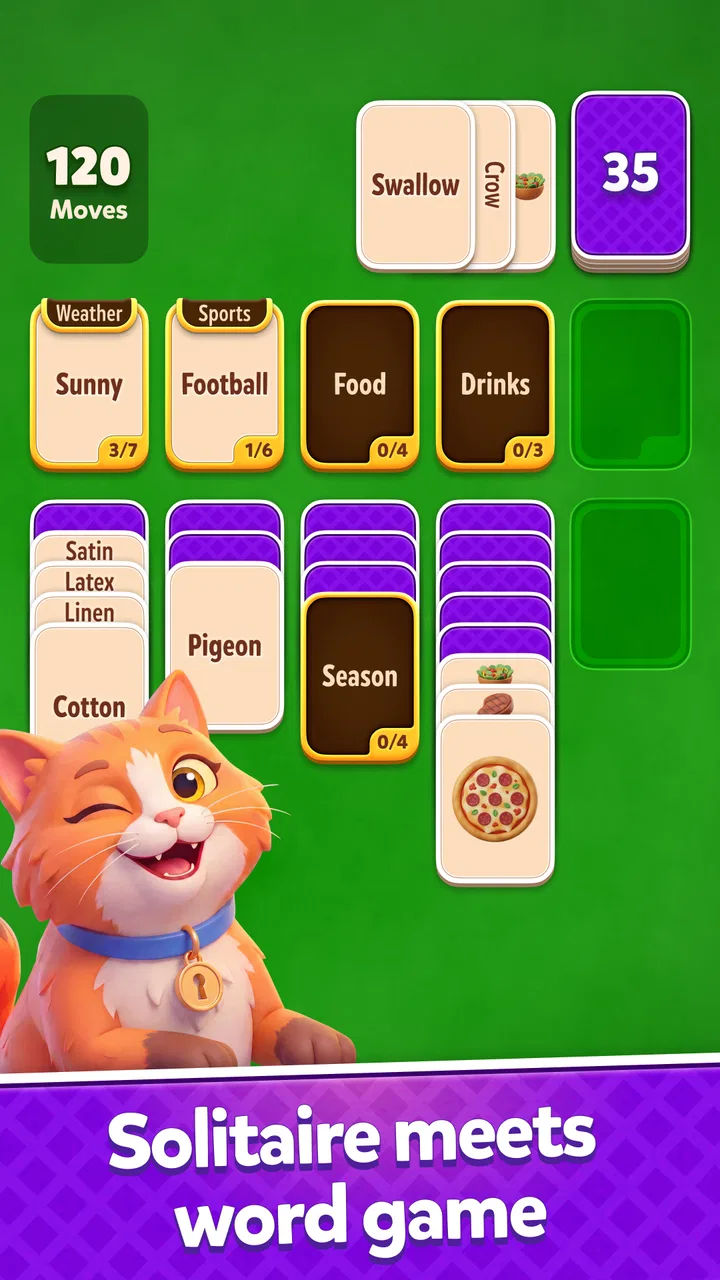
That simplicity is also the main reason I would recommend trying it. The game is free to start, aimed at Everyone, and comes from Lotum two GmbH. Its store summary presents a new take on solitaire built around connecting words and improving hotels, and that description matches the basic appeal I experienced: the cards are not only something to clear, because the words you form give the puzzle a more active, language-focused rhythm.
It currently has a 4.8 average from over 500 ratings, with more than 50 written reviews and over 10 thousand installs. Those figures suggest that it has found a small but enthusiastic audience, although I would not treat that as proof that every household will enjoy it equally. Word games can be very personal. If you prefer fast action, direct competition, or a traditional card table with no decorative layer, this may feel slower and less satisfying.
You May Also Like

 Pandora - Music & Podcasts
Pandora’s Music Is Easy to Start, but Harder to Recover
Pandora’s strength is its low-effort path from a seed to a station. Its weak spot is how much confidence it asks you to place in connection, setup, and quiet recovery.

 8 Ball Pool
 Is Built on Rivalries, Rematches, and Routine
A close look at the rivalries, rematches, shared routines, and unanswered safety questions that turn a quick pool match into a persistent mobile community.

 Samsung Music
’s Quiet Strength Is Playing What You Already Own
Its reach comes less from spectacle than from dependable access to a personal library. That simplicity is both the app’s strongest retention engine and its ceiling.

 AccuWeather: Weather Radar
AccuWeather Review: A Quick, Clear Forecast for Everyday Decisions
For everyday plans, the best forecast is the one you can understand quickly. AccuWeather makes rain timing, radar, and local conditions easy to act on, with a few trade-offs.

 Hill Climb Racing
Why Hill Climb Racing Still Turns Crashes Into One More Run
A tiny car, a bumpy hill and one more upgrade: Hill Climb Racing keeps resurfacing because its simple chaos makes every near-miss feel personal.

 AliExpress - Shopping App
AliExpress Makes Global Shopping Feel Personal, but Shoppers Bear the Risk
AliExpress turns a global marketplace into a pocket-sized discovery engine. Its reach is useful, its shopping loop compelling, and its trade-offs easy to miss.
More From Our News Desk
View All News


How it works when a household shares one device
The most natural use case is a phone or tablet kept in a common room. I can imagine playing during a coffee break, handing the device to someone else while dinner is being prepared, or leaving it available for a child and an adult to take turns. Because the central activity is a word-and-solitaire puzzle, it does not demand the same uninterrupted attention as a long strategy game. That makes it more suitable for fragmented household time than for an evening when everyone wants to sit down together.
There is an important distinction, though. This is a shared-device activity, not automatically a shared-account experience. I would not assume that progress, purchases, or decisions made by one person are separated from another person simply because several people use the same phone. If more than one household member wants to play, I would agree on a simple routine before starting: who uses the device, when it is available, and whether anyone is allowed to spend money inside the game.
That small conversation matters because the hotel-development layer can make progress feel personal. A player may want to improve a particular area, while another may simply care about solving the next word puzzle. Neither approach is wrong, but they can lead to different expectations about what should happen during a shared session. I found the game more pleasant when the household treated the device as a turn-taking space rather than as a communal project that everyone was free to alter without asking.
For a parent and child, the game can create a gentle opportunity to talk about vocabulary. I would let the younger player suggest possible words first, then discuss why a short or unusual word fits when it does. That turns a puzzle into a small language exercise without making it feel like homework. An adult can also model patience when a promising card arrangement does not immediately produce the desired word.
For siblings or partners, the better approach is probably informal cooperation. One person can look at the available letters while the other watches the solitaire structure, then switch roles. This is more interesting than simply handing over the phone after every move, because each player contributes a different kind of attention. It also reduces the frustration that can happen when one person is much faster at word games than the other.
I would not choose it as the main game for a group that wants simultaneous multiplayer. The pleasure here comes from examining the current puzzle and making a sequence of decisions, not from reacting to several people at once. A traditional board game, a timed word contest, or a dedicated multiplayer title would be a better fit for a household looking for direct rivalry.
What to settle before the first shared session
The first boundary I would set is ownership of progress. If the app is installed on a family tablet, decide whether the game belongs to one person or whether everyone is comfortable contributing to the same run. A child who spends time improving the hotel may be disappointed if another player changes the direction of that progress. On the other hand, a shared goal can work well if everyone agrees that the decoration is a group project.
The second boundary concerns purchases. The game is free to download and play, but it includes in-app purchases priced from $0.99 to $99.99 per item. That range is wide enough that I would not leave spending decisions vague on a shared device. Before anyone starts, I would make the rule explicit: no purchase without asking the device owner. This is particularly important when children can access the game, because a colorful improvement system can make optional spending feel like part of normal play.
I also recommend deciding whether the device is available during quiet times. A word puzzle can look harmless, but a person may still become absorbed in trying to finish one more layout or find a better word. In my experience, a clear stopping point works better than repeatedly interrupting someone. For shared use, a simple “finish the current puzzle, then pass it on” rule is easier to follow than an arbitrary timer.
The game supports devices running at least Android 7.1, and the current version is 1.6.0. In practical terms, I would check the operating system before planning to install it on an older family phone or a hand-me-down tablet. That is especially useful in a household where one device is kept for children or guests and may not be updated as often as a primary phone.
Those details also affect expectations around setup. I would install it on the device that will actually be used, confirm that the screen is comfortable for reading letters, and then explain the household rules before anyone begins improving the hotel. The goal is not to overcomplicate a casual game; it is to avoid a minor entertainment choice becoming an argument about access, spending, or altered progress.
Coordinating turns without making the game feel like homework
Word Solitaire Hotel works best in a household when coordination stays light. I would avoid creating a formal schedule unless several people are genuinely competing for the same device. A loose turn system is enough: the current player solves a puzzle, stops at a natural break, and says what they changed before handing over the device.
That short explanation can be surprisingly useful. If someone has been working toward a hotel makeover, the next player understands the intention instead of treating the screen as an unexplained collection of choices. It also gives the household a chance to share vocabulary. A player might mention a word they spotted, a move they saved for later, or a reason they chose one improvement over another.
For younger players, I would make the word discussion collaborative rather than corrective. If a child suggests a word that does not fit, I would ask what letters or spaces are causing the problem instead of immediately giving the answer. This keeps the focus on solving and helps the child learn how the game connects its word layer with the solitaire structure.
For adults sharing the game, coordination can be more strategic. One person can take responsibility for cautious card choices while another focuses on finding word connections. If the game presents a tempting immediate move, discuss whether it helps the current puzzle or merely looks attractive. That habit is one of the more useful ways to enjoy the hybrid design: the word layer encourages creativity, while the solitaire layer rewards attention to sequence and available options.
I would also keep the device unlocked only for the person whose turn it is. This is not because the game requires complicated supervision, but because accidental taps are especially annoying when a shared player is trying to preserve a particular arrangement. A small stand or a fixed place on the table can help too. It makes the game feel like a communal activity without requiring everyone to crowd around one small screen.
One practical trade-off is that the game may appeal to different household members for different reasons. Someone who enjoys vocabulary may focus on discovering connections, while someone who likes decoration may care more about the hotel’s visual progress. If one player dislikes either side, they may lose interest even if the other side is enjoyable. I would therefore present it as a game with two linked pleasures, not as pure solitaire or a pure word puzzle.
Age, trust, and the meaning of an Everyone rating
The Everyone content rating makes Word Solitaire Hotel approachable for a broad age range, and I can see why it would fit a family environment. Its basic concept is easy to explain, and the word-based format gives adults a way to participate without needing to master a complicated control scheme. Still, an age rating should not replace ordinary household judgment.
The more relevant question for a child is not only whether the game is suitable to see, but whether the child understands optional spending and shared progress. Since in-app purchases are available, I would explain clearly that free access does not mean every visible improvement is free. On a family device, the person who owns the payment method should remain the final decision-maker, and children should know that asking first is part of the rules.
I would also consider vocabulary differences between players. A child may know fewer words than an adult, while an adult who speaks English as an additional language may find some combinations less obvious. That does not make the game unsuitable, but it changes how it should be played. Cooperative hints, taking turns suggesting possibilities, and treating unfamiliar words as discoveries can keep the experience welcoming instead of turning it into a test.
Trust works in both directions. Adults should avoid taking over every difficult puzzle simply because they can solve it faster. Children, meanwhile, should understand that changing a shared hotel or using a purchase is not a harmless tap if someone else has invested time in the game. The hybrid design creates a useful setting for discussing digital responsibility in a calm, everyday way.
I would be more cautious about recommending it to a household that needs strict separation between players. If each person expects a private profile, independent progress, or clearly divided spending, a game designed around one shared installation may not be the right choice unless the household has another way to keep those boundaries. In that situation, separate devices or a title built specifically around individual accounts would be more suitable.
Where it stands beside ordinary word and solitaire games
Compared with classic solitaire, this game adds a reason to look beyond the card layout. Traditional solitaire is often ideal when I want a familiar, self-contained challenge with no extra theme to consider. Here, the word connections make each turn feel more expressive, and the hotel makeover gives progress a visible direction. The cost is that players who want a clean card puzzle may find the added layer distracting.
Compared with a standard crossword or word-search game, it offers a different kind of concentration. I am not simply filling a grid or scanning for hidden terms; I am balancing possible words with the order in which cards can be handled. That combination can be more engaging for someone who finds ordinary word lists too static. It may be less satisfying for a player who wants precise clues, a large vocabulary challenge, or a purely linguistic test.
Compared with a fast word game, the pace is more forgiving. I can pause to inspect the layout, which helps in a shared household where interruptions are normal. The trade-off is reduced excitement for players who enjoy countdowns, head-to-head pressure, or rapid-fire scoring. I would choose this for relaxed concentration, not for an adrenaline-filled competition.
The hotel theme also separates it from minimalist puzzle apps. It gives decisions a sense of direction, but it can make the experience feel more like a long-term progression than a collection of independent rounds. Players who enjoy gradual visual improvement may appreciate that motivation. Players who dislike decorative goals or prefer to finish a puzzle and move on may see it as unnecessary baggage.
One of my more useful tips is to decide which part of the game you are using as your personal measure of success. If you judge every session only by hotel progress, a difficult puzzle can feel unproductive. If you judge it only by word discovery, you may ignore the card order that makes the game distinctive. Switching between those two goals keeps the experience from becoming repetitive and makes cooperative play easier.
Who should install it, and who should pass
I would recommend it to someone who already likes solitaire but wants more involvement than simply clearing cards. It is also a good candidate for a shared tablet used by adults and older children who enjoy words, taking turns, and gradual visual progress. The free entry point makes it easy to test the central idea before deciding whether it deserves a regular place on the device.
I would especially suggest it for short, interrupted sessions. A person waiting for an appointment, relaxing after work, or sharing a quiet evening at home can pick it up without committing to a long story or a complicated ruleset. The combination of card planning and word formation gives the mind something to do, while the hotel layer adds a reason to return.
I would skip it if your priority is a completely traditional solitaire experience. I would also look elsewhere if you want live multiplayer, a competitive leaderboard-driven format, or a word game built around detailed clues. Families that require strongly separated user spaces should be cautious as well, because shared-device enjoyment depends on agreeing about progress and spending boundaries.
Another possible mismatch is for players who dislike optional purchases on principle. The game is free, but the presence of items ranging from $0.99 to $99.99 means the household should be comfortable managing that possibility. If seeing purchase options makes a casual game feel less relaxing, a paid-up-front alternative may provide a better experience, even if it lacks this particular combination of words, solitaire, and hotel improvement.
My household verdict after weighing the trade-offs
My overall impression is that Word Solitaire Hotel succeeds when I treat it as a calm, cooperative puzzle with a decorative destination. The word mechanics give solitaire a fresh reason to think, while the hotel setting provides continuity between sessions. It is approachable enough for shared use, but not so simple that every player will enjoy it for the same reason.
The strongest household setup is one where everyone understands the boundaries: the device is shared, progress may be communal, and purchases require permission. With that in place, the game can become a pleasant little routine. A parent and child can discuss words, partners can solve layouts together, and siblings can take turns without needing a formal competition.
The weakest setup is an unattended shared device where several people assume they have separate progress or where a child can make purchase decisions without an adult checking first. Those problems are not solved by the game’s friendly presentation. They are household-management issues, and I would address them before installing any free game with optional purchases.
Lotum two GmbH has made a focused word game rather than an all-purpose family platform. That focus is a strength: the central idea is easy to understand, and the blend of card planning with word connections gives it a recognizable identity. It is also a limitation, because anyone uninterested in either side of that blend will probably not be persuaded by the hotel theme alone.
For me, the deciding question is simple: would you enjoy finding words while thinking several card moves ahead, and are you happy to share progress under clear household rules? If the answer is yes, the free version is worth trying. I would keep expectations realistic, supervise spending on a shared device, and choose a different game when the household wants direct multiplayer, private player boundaries, or classic solitaire without extra layers.
FAQs for Word Solitaire Hotel
01What is Word Solitaire Hotel, and how does the gameplay work?
Word Solitaire Hotel combines classic solitaire-style card mechanics with word puzzles and a relaxing hotel theme. Instead of only arranging cards, you generally form words from the available letters to clear levels and progress through different hotel areas. The game is designed for casual play, with short stages, simple touch controls, and gradually increasing difficulty as new challenges and objectives are introduced.
02Is Word Solitaire Hotel free to download and play?
Word Solitaire Hotel can typically be downloaded and played for free, but it may include optional in-app purchases. These purchases can provide coins, boosters, extra moves, or other helpful items, while advertisements may appear between levels or during certain actions. You can usually make progress without spending money, although later puzzles may require more patience if you choose not to use paid assistance.
03Can Word Solitaire Hotel be played without an internet connection?
Some parts of Word Solitaire Hotel may remain available offline, particularly previously loaded levels and basic gameplay. However, an internet connection may be needed for advertisements, cloud synchronization, special events, account features, updates, or in-app purchases. Offline availability can also vary by device and version, so it is best to launch the game online at least once before relying on it during travel.
04Is Word Solitaire Hotel suitable for beginners and children?
The game is generally approachable for beginners because its controls are based on tapping, selecting, and arranging letters or cards. The early levels usually provide a gentle introduction before adding more complicated layouts and objectives. Parents should still review the store’s age rating and spending settings, since the game may contain advertising, optional purchases, and social or promotional features depending on the platform.
05What should I know about ads, purchases, and game progress before downloading?
Word Solitaire Hotel may use advertisements and optional purchases to support its free-to-play model. Boosters can make difficult stages easier, but they are not always essential if you are comfortable replaying levels or waiting for additional resources. Progress may be connected to the device or an account, so check whether cloud saving is supported before changing phones, uninstalling the app, or playing across Android and iOS.
Pros
- Relaxing solitaire gameplay suited to short sessions.
- Hotel-themed progression adds a light sense of purpose.
- Simple controls make it accessible for casual players.
- Playable offline in many situations.
- Frequent rewards help maintain engagement.
Cons
- Ads may interrupt play
- especially between levels.
- Some features and rewards may require in-app purchases.
- Difficulty can feel uneven across certain solitaire deals.
- Progression may become repetitive after extended play.
- Battery use can increase during longer sessions.

Word Solitaire Hotel
Gallery